Platform Atlas

Everything in Trueleveler, on one page.

26 AI engines · 13 trackers · 4 workflow tools · 82 automated chain connections · 5 project phases. No signup required — explore before you try.

26AI engines
13Trackers
82Chain connections
5Project phases

The 26 AI Engines

Every engine grouped by where it lives in your project flow. Click any card to see inputs, outputs, and which engines it chains into.

Pre-Award — 5 engines

Analyze scope, level bids, and generate RFQs before contract award.

RFQ Generator

Pre-Award
Pro +

Build a structured, bid-ready RFQ from scope documents.

Bid Leveling

Pre-Award
Pro +

Compare up to 10 vendor quotes side-by-side against your RFQ.

Bid Scope Compliance

Pre-Award
Pro +

Verify each bid covers every scope requirement before you commit.

Submittal Extractor

Pre-Award
Business +

Scan spec sections and build a complete, sortable submittal register.

Scope Builder

Pre-Award
Pro +

Spec text → trade scope narratives (inclusions / exclusions / assumptions / qualifications).

Award — 3 engines

Review contracts clause-by-clause, generate PM summaries and structured handoff reports.

Contract Review

Award
Pro +

Flag risky clauses, missing protections, and liability exposure.

Contract Summary

Award
Pro +

PM-friendly summary of key terms, obligations, and critical dates.

PM Handoff Report

Award
Pro +

Compile risks, scope gaps, contacts and milestones into a structured handoff brief.

Post-Award — 9 engines

Monitor purchase orders, invoices, change orders, and payment applications.

PO vs Quote

Post-Award
Pro +

Cross-check Purchase Order against the original quote — catch pricing discrepancies.

Quote vs Invoice

Post-Award
Pro +

Compare vendor invoice against the original quote — catch overcharges and billing errors.

PO vs Invoice

Post-Award
Pro +

Match Purchase Order to incoming invoice — verify the vendor billed what was ordered.

Change Order Review

Post-Award
Pro +

Check if CO work was already in scope and flag excessive pricing.

Pay App Audit

Post-Award
Pro +

Narrative audit of a pay application — billing accuracy, unsupported costs, duplicates, retainage drift.

Schedule Risk

Post-Award
Business +

CPM + 1000-trial Monte Carlo over your schedule + tracker state.

Warranty Compiler

Post-Award
Pro +

Approved submittals + POs → structured warranty package for closeout.

As-built Reconciler

Post-Award
Business +

Construction-set vs field-marked as-builts → structured redline log.

Bid vs Actual

Post-Award
Business +

Closeout report comparing original bid line items against actual cost outcomes.

Field & Compliance — 9 engines

Track insurance, RFIs, owner reports, field conditions, and punch lists.

Owner Report

Field & Compliance
Pro +

Generate executive owner report with schedule status, budget, and risks.

Field Daily Report

Field & Compliance
Pro +

Structure daily field data: work completed, manpower, weather, safety issues.

RFI Drafter

Field & Compliance
Pro +

Drafts RFIs from spec/drawing conflicts with cited evidence and recipient routing.

Submittal Reviewer

Field & Compliance
Pro +

Spec vs submittal text → structured deviation findings + review_result.

Voice Synthesis (Meetings)

Field & Compliance
Pro +

Recorded meeting → structured minutes with every decision, action, and risk anchored to its exact audio moment.

Closeout Builder

Field & Compliance
Pro +

Warranties + as-builts + punch closeout + O&M docs → owner package.

Pay App Review

Field & Compliance
Pro +

AIA G702/G703 → reconciled line items + math/over-billing flags.

Daily Log Synthesizer

Field & Compliance
Pro +

Today's voice + photos + deliveries + RFIs → structured daily report.

Punch List Drafter

Field & Compliance
Pro +

Site-walk voice + photos → structured punch list with trigram dedupe.

Tracking — 6 engines

Extract submittals and track procurement across all vendors.

COI Tracker

Tracking
Pro +

Verify insurance coverage limits, expiry dates, additional insureds, and flag gaps.

RFI Tracker

Tracking
Pro +

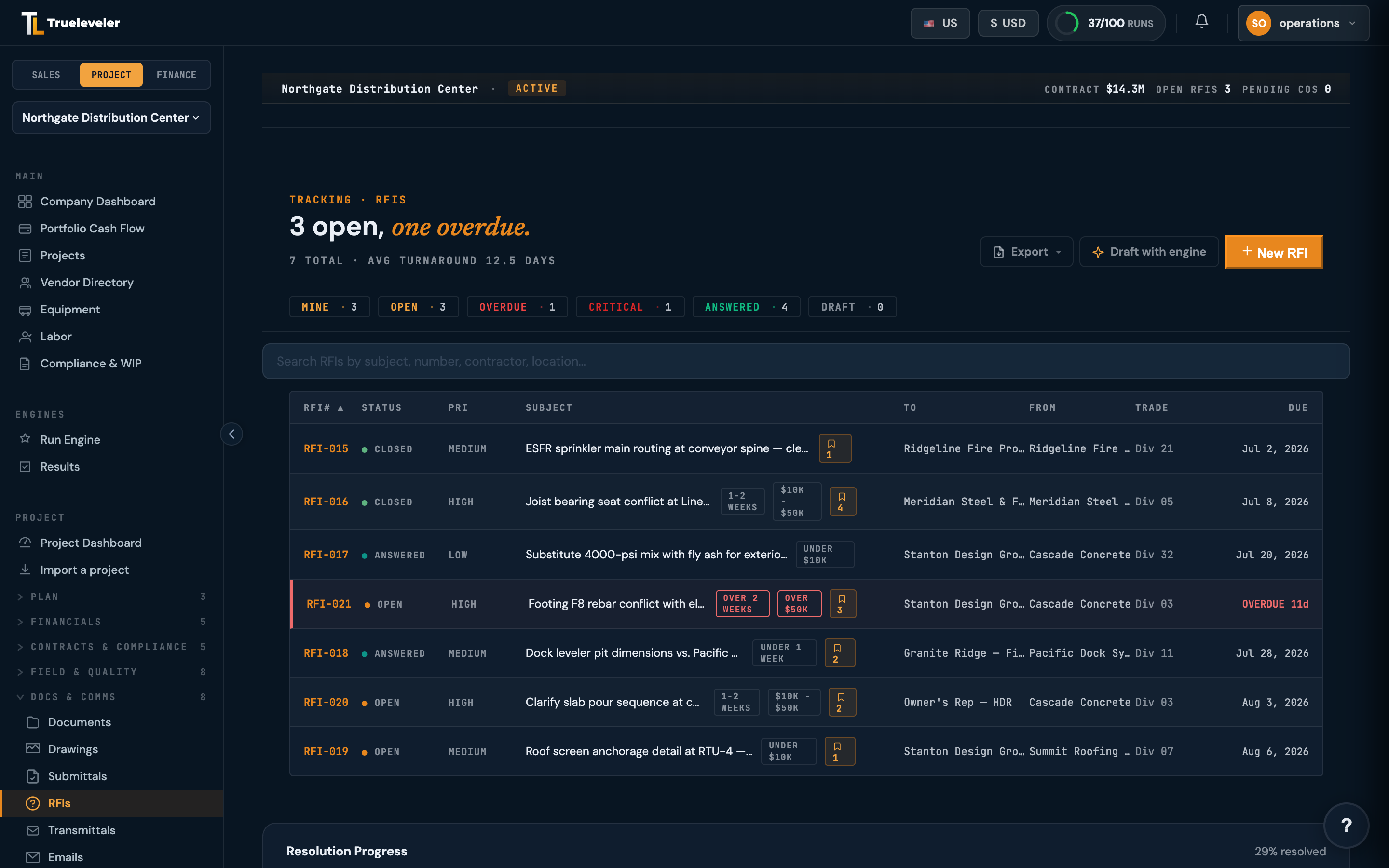
Extract RFI items, prioritize open issues, and surface cost impacts.

Punch List

Tracking
Pro +

Extract deficiency items and assign trade responsibilities.

Submittal Tracker

Tracking
Business +

Track submittals through the full lifecycle — extraction to final approval.

Procurement Tracker

Tracking
Pro +

Live PO log — track deliveries, invoices, and budget burn across all vendors.

Equipment Scheduler

Tracking
Business +

Cross-project shared equipment — conflict detection + re-sequence proposals.

The Chain Graph

82 automated data flows between engines. Solid lines carry just a suggestion; dashed lines carry data forward (the source engine's output auto-populates the target engine's input).

PRE-AWARDAWARDPOST-AWARDFIELD & COMPLIANCETRACKING Verify Bids Against This RFQ — Upload vendor bids and check them against the RFQ you just generated.Compare Quotes When They Come In — Level vendor quotes against this RFQ for an apples-to-apples comparison.Verify Quote vs Invoice — When vendor invoices arrive — compare against the RFQ quote to catch overcharges.Level the Qualifying Bids — Compare the vendors that passed scope check side-by-side.Review the Subcontract — Upload the full subcontract for clause analysis and risk review.Review Pay Applications — Verify pay applications against the scope requirements you just checked.Review the Winner's Contract — Upload the winning vendor's contract — AI checks for unfavorable clauses, notice traps, and liability exposure.Compare PO vs Invoices — During construction — verify invoices match the contract and PO terms.Review Change Orders — When COs come in — check if the work was already in scope.Generate Contract Summary — Create a concise PM-friendly summary of the key contract terms and obligations.Review Pay Applications — Review payment applications against the contract terms you just analyzed.Verify Insurance Coverage — Contract requirements carry forward \u2014 verify that COI meets the insurance provisions in the contract.Track Contract RFIs — Contract terms carry forward \u2014 RFIs are checked against original contract scope and obligations.Contract Context for Report — Contract terms and risks carry forward to provide context in the owner progress report.Dispute as Change Order? — Found discrepancies? Check if it qualifies as a disputed change order.Check the Underlying Contract — Review the contract behind this PO for risk clauses.Re-check the Contract — Verify whether the change order work was covered in the original contract scope.Verify in Next Pay App — Check that the approved CO amounts are correctly reflected in the next billing cycle.Compare Related Invoices — Verify the invoices related to this change order match the approved amounts.Roll into Bid vs Actual — Approved COs roll into the bid-vs-actual cost variance analysis at the cost-code level.Time-Extension Risk? — CO includes a time impact — feed it into schedule-risk for downstream sequencing.Check the Underlying Contract — Found billing discrepancies? Review the contract to check payment terms, retainage, and allowable charges.Review Related Change Orders — Check if any disputed line items relate to approved or pending change orders.Track in Procurement — Log verified pay app items into the procurement tracker for cost monitoring.Compare to Bid — Pay app actuals roll into bid-vs-actual to surface cost variance per cost code.Include in Owner Report — Pay app data carries forward \u2014 budget performance and billing status feed into the owner report.Run Full Contract Review — Run a detailed AI contract review to surface more risk flags and obligations for this handoff.Generate Contract Summary — Create a concise contract summary highlighting key terms for the PM.Import to Submittal Tracker — Auto-import extracted submittals as submittal tracking items.Review Submittal Quality — Run AI review on the extracted submittals to flag spec deviations and substitution requests before logging.Verify Subcontractor Bids Cover Submittals — Check if vendor bids address the submittal requirements you just extracted.Extract More Submittals — Upload additional spec sections to extract more submittal requirements.Track Procurement Status — Move approved submittals into procurement tracking for ordering and delivery.Verify Against Submittals — Cross-check punch items against approved submittals for spec compliance.Compile Warranties — Approved manufacturer submittals are the source for warranty terms in the closeout package.Run Full Contract Review — Dive deeper with a clause-by-clause risk analysis of the contract.Generate PM Handoff Report — Create a structured handoff brief with risks, deadlines, and action items.Generate RFQ for Item — Create a request for quotation for procurement items that need vendor quotes.Track Submittals — Link procurement items to their submittal tracking requirements.Compare to Bid — Procurement actuals (committed + spent) feed the bid-vs-actual variance lens.Long-Lead Risk — Delays in critical-path procurement items roll up into schedule-risk detection.Schedule Shared Equipment — Equipment-class procurement items feed into multi-project equipment scheduling.Dispute as Change Order? — Found discrepancies between quote and invoice? Check if it qualifies as a change order.Check the Underlying Contract — Review the contract behind these documents for risk clauses.Dispute as Change Order? — Found discrepancies between PO and invoice? Check if it qualifies as a change order.Check the Underlying Contract — Review the contract behind this PO for risk clauses.Track COI Renewals — Push insurance renewal dates and coverage status into procurement tracking for vendor management.Verify Before Payment — Confirm valid insurance coverage before approving pay application \u2014 expired COI blocks payment.RFI Triggers Change Order? — RFI response reveals scope change \u2014 check if it qualifies as a valid change order.Verify RFI Against Scope — Cross-check RFI items against original bid scope to confirm coverage or identify gaps.Brief the PM — Owner report insights inform PM handoff with current project status and risks.Verify Work Progress — Field report work completed data used to validate pay application progress claims.Feed Daily into Report — Daily field data carries forward \u2014 aggregated into owner progress reports.Synthesize Daily Log — Raw field observations feed daily-log synthesis for weather, manpower, materials, and exceptions.Field Issues Need RFI — Field observations that require design clarification are routed to RFI tracking.Draft an RFI Now — Field-captured ambiguity? Draft the RFI immediately and route it through the tracker.Synthesize Site Walk Voice — Walk audio captured during the visit feeds voice synthesis for RFI / CO / punch extraction.Extract Deficiencies — Field report deficiency observations carry forward as punch list items.Block Final Payment? — Outstanding punch items may block retention release or final payment approval.Closeout Status Update — Punch list completion percentage feeds into owner report closeout section.Build Closeout Package — Punch list completion feeds the closeout package — 100% sign-off is a closeout prereq.Log Review Decision — Reviewed submittal status (Approve / Approve as Noted / Revise / Reject) carries forward into the submittal tracker.Submittal Conflict → CO? — Review flagged a spec deviation or substitution — check if it qualifies as a change order.File the RFI — Drafted RFI flows directly into the RFI tracker for routing, response, and aging.Time-Impact CO — Schedule slippage detected — review whether the delay justifies a time-and-cost change order.Expedite Procurement — Schedule risk traced to long-lead material — surface the at-risk items in the procurement tracker.Flag in Next Pay App — LD risk or recovery acceleration — review the next pay application against the current schedule status.Update Delivery Status — Daily log mentions material deliveries or shortages — update the procurement tracker.Surface Schedule Risk — Weather, manpower shortfalls, or rework noted in the log feed schedule-risk detection.Walk Captured an RFI — Voice note flagged a design clarification need — file as RFI in the tracker.Add Punch Items — Punch list items captured during the walk push directly into the punch tracker.Walk Identified a CO — Voice note flagged out-of-scope work — review it as a change-order candidate.File Punch Items — Drafted punch items push directly into the punch list tracker for assignment and aging.Final Owner Report — Closeout deliverables (warranties, asbuilts, lien releases) feed the final owner closeout report.Add to Closeout Package — Compiled warranty entries flow into the closeout builder for the final deliverables booklet.Attach to Closeout — Reconciled as-built drawings feed the closeout package as a required deliverable.Investigate CO Drivers — Significant cost variance — review the change orders that drove the spread vs. original bid.Audit Procurement — Variance traced to material overruns — drill into procurement for cost-code-level detail.Conflict → Schedule Risk — Detected equipment-demand overlap between projects — feed it into schedule risk for re-sequencing.Rent Replacement? — Conflict unresolvable internally — track an external rental as a procurement item.Generate RFQ from Scope — Drafted scope feeds straight into RFQ generation — every line item becomes a structured RFQ section.Check Bids Against Scope — Use the drafted scope as the canonical reference for vendor-bid scope checks. RFQ Generator Bid Leveling Bid Scope Compliance Submittal Extractor Contract Review Contract Summary PM Handoff Report PO vs Quote Quote vs Invoice PO vs Invoice Change Order Review Pay App Audit COI Tracker RFI Tracker Owner Report Field Daily Report Punch List Submittal Tracker Procurement Tracker RFI Drafter Submittal Reviewer Voice Synthesis (Meetings) Closeout Builder Equipment Scheduler Pay App Review Schedule Risk Daily Log Synthesizer Punch List Drafter Warranty Compiler As-built Reconciler Bid vs Actual Scope Builder
Solid — next-step suggestion Dashed — data carries forward Hover or tap a node to isolate its connections.
Click any engine above to see its upstream and downstream connections.

Workflow Tools

4 utility surfaces that don't consume an AI-run quota — they're part of every plan, including the free trial. These are what you use between engine runs to keep the project moving.

Schedule Tracker

Included in every plan

Interactive Gantt chart with milestones, dependencies, and progress tracking.

Full-featured Gantt with day-level columns, 5/7-day work-week toggle, drag-to-reschedule, baseline capture, auto critical-path highlighting, What-If delay impact modeling, dependency arrows, and CSV/PDF export. Bidirectional sync with the trackers — RFI delays feed back into schedule float automatically.

Gantt chartBaseline varianceCritical pathWhat-If delay modelingCSV + PDF export

Email Classifier

Included in every plan

AI-powered sorting of project emails by type: RFIs, submittals, COs, pay apps.

Paste in or forward a project email; the classifier routes it to the right tracker (RFI log, submittal register, CO register, pay-app review) and suggests tasks. Turns the email backlog from a 30-minute end-of-day chore into automatic project history.

Classified typeSuggested tracker entrySuggested taskAuto-link to matching project

Task Manager

Included in every plan

Create, assign, and track tasks with priority and deadline management.

Project-scoped task list with subtasks, due dates, priorities, assignees, and dependencies. Accepts AI-suggested tasks from every engine and tracker. Kanban board + list view. Comments + activity feed per task.

Kanban + listSubtasksDependenciesComments + activityAI-suggested tasks from engine runs

Doc Chat

Included in every plan

Ask follow-up questions about your engine results and explore findings.

Every engine result is queryable. "Why did you flag this clause?" "What's the recommended next step if Meyer slips mobilization?" Doc Chat answers using the engine's actual output + source documents, with citations. Also works across the full project memory (Pulse Chat) — answers that require data from multiple engines.

Contextual Q&ASource citationsCross-engine answers via Pulse Chat

Worked Example: Bridgeport Datacenter

180-MW hyperscale datacenter in southwestern Connecticut. $45M electrical subcontract, 8 bidders, 26 weeks from RFQ to substantial completion. This is how Trueleveler walks through a real project day by day.

ProjectBridgeport Datacenter Phase 2
PackageElectrical — CSI Div 26
Contract value$45M
PMSarah (GC pre-con, owner rep)
Engine runs47 over 26 weeks
Recovered from reconciliation$277K
Day 1 (Monday)

RFQ issued to 8 electrical subs

Sarah pastes her scope narrative for the $45M electrical package into RFQ Generator. 38 seconds later she has a 4-page structured RFQ with 212 line items across CSI Division 26, inclusion/exclusion language she'd normally spend 2 hours writing, and a blank bid form. She exports, attaches the specs, and sends to 8 pre-qualified subs.

Day 6 (following Mon)

7 of 8 bids received

As bids arrive, Sarah runs Bid Scope Compliance on each one. Two subs have silent exclusions she'd have missed on a manual read — one excluded "temporary power during construction" (a $340K item buried at line 187); another excluded "seismic bracing per IBC Section 1705" which is mandatory for this jurisdiction. Both drop to conditional. She requests clarifications.

Day 9

Bid leveling, 7 qualifying quotes

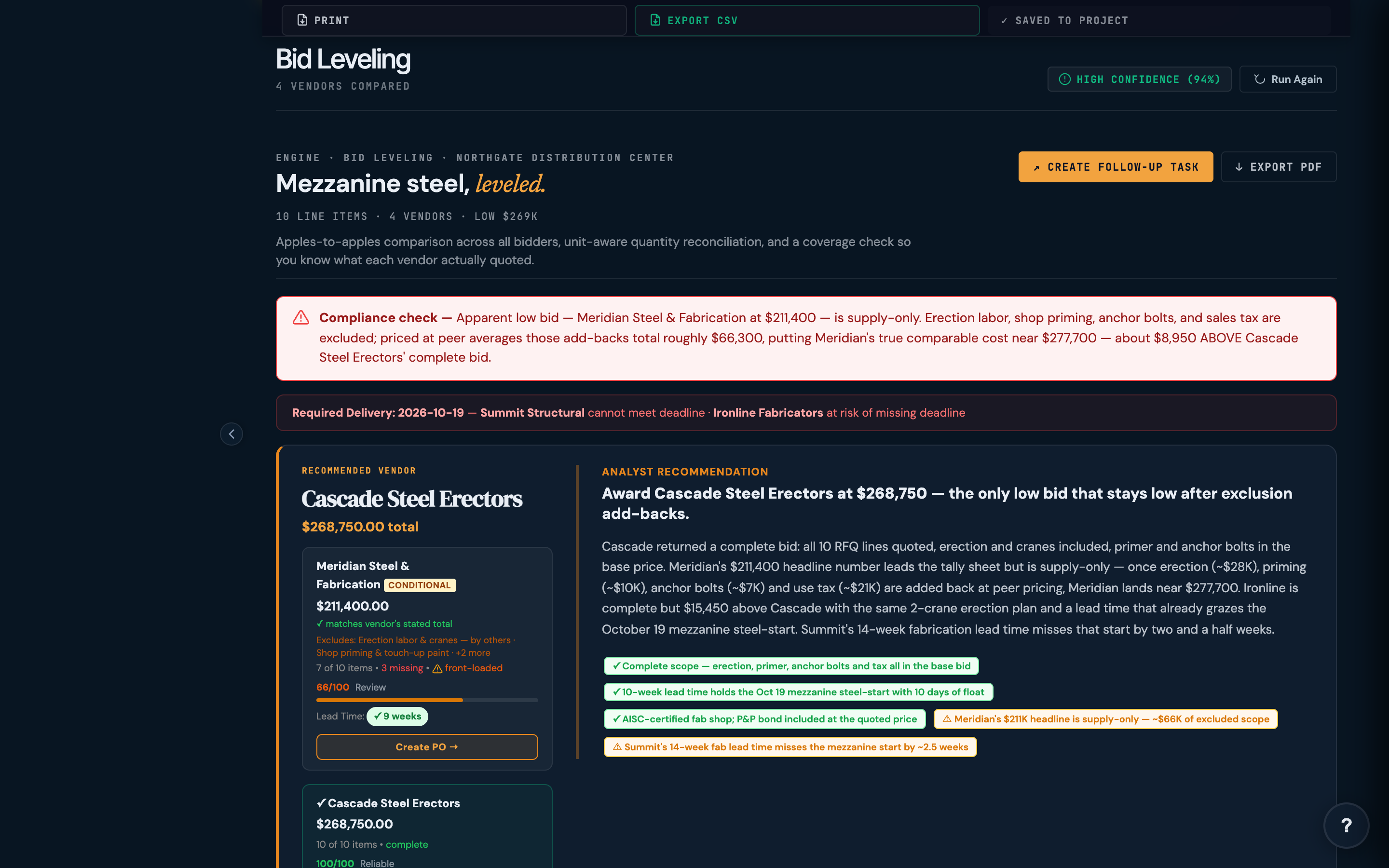
Bid Leveling normalizes the 7 qualifying bids against the RFQ. Meyer Electric comes in 18% above peer average on labor but 12% below on material — classic unbalanced bid pattern the engine flags as a risk. Apex Electric is 3% above the median with a strong reliability score (8 prior projects, zero disputes). The engine recommends Apex; Sarah agrees, generates a PO directly from the leveled tab.

Contract drafted, run through review

Apex's standard AIA A401 subcontract goes through Contract Review. 41 clauses, 7 flagged: the LD rate is $8,500/day (above this project's industry norm of $5,000), the pay-if-paid provision is broad enough to survive owner bankruptcy, and flow-down is one-way favoring the GC. Sarah negotiates the LD down to $6,000 and adds a liquidated-cap of 10% of contract value. PM Contract Summary produces the 2-page brief she sends to her field PM, Mike.

Day 18

Insurance tracker wired to contract

Apex's COI arrives. COI Tracker cross-checks against the contract's insurance requirements (chained from Contract Review): GL limit meets $2M/$4M, Auto meets $1M, but Umbrella is $3M where the contract requires $5M. Sarah flags to Apex, gets updated COI 48 hours later. Tracker confirms compliance and sets expiry alerts.

Day 45

First pay application

Apex submits Pay App 1 for $2.8M on a $45M contract, claiming 6.2% complete. Pay App Review flags: (1) Line items 7 and 12 show ≥25% single-period jumps with no schedule change, (2) $340K in "stored materials" has no backup invoices or bills of lading, (3) retainage was calculated at 5% but the contract specifies 10% through 50% complete. Recommended payment: $2.31M after retainage correction and stored-materials discount.

Change order #3 — owner directive

Owner directs a power-density upgrade for Pod 3. Apex submits CO #3 for $847K. Change Order Review cross-references the original contract's Division 26 scope. Verdict: 62% of the requested work was outside original scope (new 2000A switchboard, additional 1200MCM feeders), 38% was arguably within (the additional branch circuits were part of the performance spec). Engine recommends $548K with clause 7.3 citation. Sarah negotiates from that position.

Day 89

Owner progress meeting

Owner Report pulls from the 11 sessions accumulated so far (contract, pay apps 1-3, CO 1-3, RFIs, insurance status) and assembles the executive brief: schedule variance -4 days, budget burn at 21% against 18% planned, 2 open risks (long-lead switchgear, Pod 7 rough-in dependency on mechanical), and 3 asks for the owner. Meeting is 22 minutes instead of 90.

Day 145

Substantial completion, punch begins

Owner walkthrough generates 184 punch items. Punch List extracts them from the markup document, assigns each to the right trade (Apex has 112), categorizes by location and severity, and tracks close-out. Final closeout is 60% faster than Sarah's last datacenter of similar scale.

Day 156 (retrospective)

Final invoice reconciliation

Final Apex invoice of $47.2M runs through PO vs Invoice. Catches $112K in over-billed materials against the PO's final quantities, $48K in a freight line item that wasn't on the PO, and a $23K retainage math error. Sarah recovers $183K before final payment. Quote vs Invoice on the 3 other vendors who finished recovers another $94K across the portfolio.
Data, storage, and how engines share context

What gets stored

  • Engine sessions — the structured outputs (JSON) of every engine run, scoped to your project. Used for chain context and Pulse Chat.
  • Vendor memory — a global vendor record per org: names, contacts, reliability scores, historical bids, tags. Carries across projects.
  • Project audit log — every document uploaded, engine run, team-member action, and export. Full forensic trail.
  • Tracker state — submittals, RFIs, procurement items, punch list, schedule items, tasks, COI records.

What doesn't get stored

  • The uploaded documents themselves — contract PDFs, vendor quotes, invoices, spec sections. Read once, analyzed, discarded.
  • Attachments beyond trackers — files you specifically attach to a COI record or submittal persist in scoped storage; documents used as engine input do not.
  • Cross-org data — your organization's project data never touches another org's context, with RLS policies enforced at the database layer.

Exports per engine

Every engine output can be exported to PDF (formatted report), CSV (raw data), or XLSX (Excel with formulas preserved where applicable). Bid Leveling exports round-trip cleanly with a downstream PO template. Contract Review exports with clause references as hyperlinks.

Integrations roadmap

Today: CSV/XLSX import-export for every tracker. On deck: Procore Financials import, Autodesk Construction Cloud submittal-register sync, QuickBooks pay-app export. Coming with Enterprise tier: direct API access and webhooks for custom integrations.

Security posture

Encryption at restAES-256
Encryption in transitTLS 1.3 everywhere
Row-level securityEnforced on every table
SOC 2Type I in progress, target Q3
GDPR + CCPACompliant; CCPA opt-out page active
Data residencyUnited States

Plans & pricing

Every plan includes all 26 AI engines and all 4 workflow tools. Plans scale analysis runs, active projects, and team seats.

Free Trial
$014 days
No credit card
  • 15 analysis runs total
  • all access

Full access to every engine + tool for 14 days with 15 analysis runs.

Business
$499/month
Growing departments
  • 300 analysis runs/month
  • All 26 engines + 13 trackers + 4 tools

300 runs, 30 projects, 10 seats, submittal extraction, API access, international normalization.

Enterprise
$1,099/month
Multi-office GCs
  • 2500 analysis runs/month
  • All 26 engines + 13 trackers + 4 tools

2,500 runs, unlimited projects + seats, SSO (Google, Microsoft) with SAML on request, priority processing, dedicated support.

See full plan comparison →