Engine · Project · COMING JUNE

The super already does the field. We make the log write itself.

Mobile capture in the field: photos, voice tags, crew counts. End-of-day synthesis at the desk: a structured daily log that auto-counts manpower by trade, attaches the day's weather, maps work to schedule activities, and flags gaps before they become problems. The PM stops chasing supers for their logs.

~3 min
field capture / day
0
typing required
Auto
crew count from photos
1 page
project-wide daily
01 · How it works

Field captures. The desk gets the log.

The super's existing day — walking the floors, eyeballing crews, watching deliveries arrive — produces the data. The engine just collects it, structures it, and routes it.

Step 1 · Field

Photo + voice tag

The super opens the app, takes 8–15 photos through the day, dictates a 5-second voice note per photo. "L4 east, MEP rough-in, Acme has 6 guys." The voice gets transcribed; the photo is geotagged + timestamped.

Step 2 · Synth

End-of-day synthesis

At 5pm the engine pulls the day's captures, weather from NOAA for the project ZIP, deliveries logged in Procurement, the schedule activities scheduled for the day, and any meeting that touched the project. Synthesizes them into one log entry.

Step 3 · Route

Routed to four places

Daily log entry goes to project memory. Deliveries received hit the Procurement tracker. Crew counts feed Schedule Risk's manpower forecasting. Safety incidents route to the safety log. Owner sees the redacted version in their next report.

02 · What ends up in the log

The fields that the daily log was always supposed to have.

One synthesized entry, every day, with the data the project actually needs — not just the data the super remembers to type.
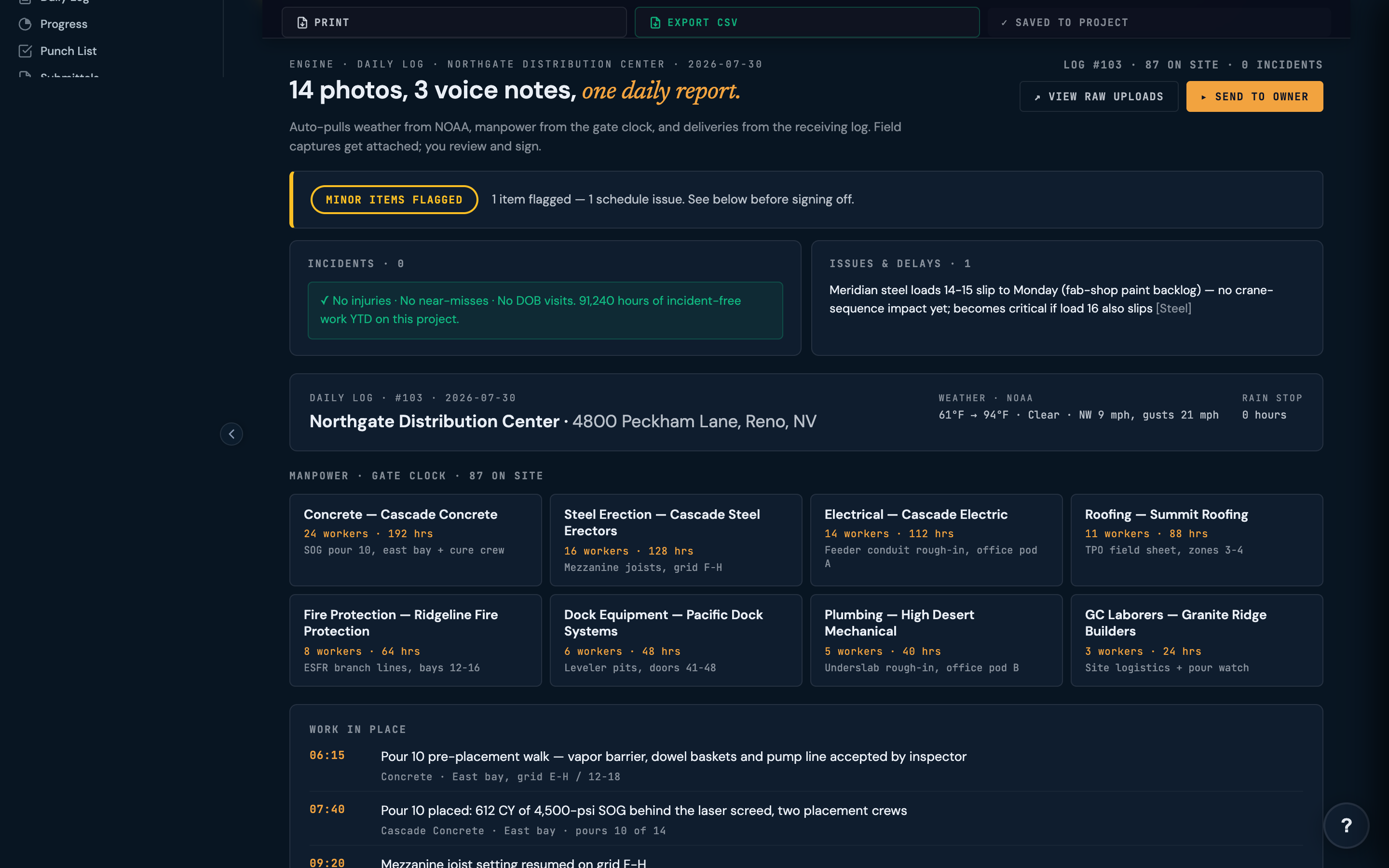
DATE2026-06-04Thursday · Day 247 of 380 · 62% calendar / 58% activities complete On track
WXWeatherHigh 71°F / Low 54°F · 0.0 in precip · Wind 8mph WSW. No weather impact.NOAA · auto
CREWManpowerTotal: 47 trade workers + 3 supervisors. By trade: Conc 8, Steel 6, MEP 14, Drywall 11, Painters 5, Misc 3. Auto-counted
WORKCompletedL4 East — MEP rough-in 90% (activity 2147). L3 West — drywall hang continued (activity 2152). L5 — deck pour staging. Mapped to CPM
DELDeliveriesWalsh Steel — W12×26 col delivery, 8:14am, signed. Acme Mech — FCU units (12 of 24), 11:30am. Pending: rebar Friday.From Procurement
SAFESafetyToolbox talk: fall protection refresher (Acme MEP). Crews acknowledged: 14. No incidents.All clear
GAPFLAGGEDActivity 2138 (waterproofing L2) scheduled today — no log entry, no crew photographed in that area. Confirm complete or push to schedule. Verify
The gap-flagging is the value

Most daily logs only record what happened. We also surface what was supposed to happen and didn't appear in the captures. That gap — the activity scheduled for today with no evidence of work — is where schedule slip starts. We flag it on day 1, not on day 30 when the four-week look-ahead reveals it.

03 · For the PM, not the super

Built for the desk. Powered by the field.

The pitch in one sentence

The super already does the field work. The PM already needs the log. We're just stitching them together so neither has to do the data-entry that nobody enjoys.

Supers don't write good daily logs because their job is to walk the site, not type at the laptop. The best supers send back a few photos and a paragraph of texts — you piece it together at the desk. Many never send anything, and you spend Monday morning reconstructing Friday from memory.

This engine doesn't try to change how the super works. They keep walking. They keep snapping photos. They keep dictating two-sentence voice notes when something matters. The engine reads the photos, transcribes the voice, counts the crews, adds the weather, maps to the schedule, and produces the log entry the PM and owner expect.

For the PM: a clean entry on their desk by 5:30pm every day. For the owner: a one-page weekly that includes manpower curves, schedule progress, and any gap flags — without the PM having to assemble it.

04 · The data nobody else captures

Manpower curves from the photos themselves.

This is the unfair advantage. We use computer vision on the field photos to count people by trade — not perfectly, but consistently. Over 60 days that's 60 manpower-by-trade data points the PM can review without anyone hand-typing them.

Manpower forecasting

Compare actuals to the schedule's assumed crews

The schedule assumes "MEP rough-in needs 12 workers for 14 days." The photos show MEP averaging 8 workers for the last 6 days. We flag the manning gap before it becomes a schedule slip.

Crew trends

Trade ramp-up + demobilization patterns

Charts show concrete crew demobilizing (expected), MEP scaling up (expected), drywall starting (expected). Anything missing — a trade that should be ramping but isn't — surfaces as a flag.

Counting accuracy improves over the first 2–3 weeks per project as the engine learns your site conditions and PPE color patterns. Manual override on any count is one tap.

★ · Pairs with

It works alone. It's better in a chain.

The daily log isn't useful as a standalone artifact — it's useful when other engines read it and act.

05 · FAQ

Beta questions we keep getting.

What if my super won't use a new app?

Capture works through the existing site-walk routine — opening the camera, taking a photo, holding the mic button while talking. No data entry, no forms. If the super is already sending you photos and texts, capture is the same gesture in one app instead of three. If they're truly app-resistant, the PM can capture during walk-throughs and the engine still produces the synthesized log.

What about offline / spotty cell on site?

Captures save locally and sync when connectivity returns. Voice transcription runs on-device for the first pass; cloud refinement happens at sync time. We've tested in basement-level work, parking structures, and rural sites — offline capture is the default expectation, not the edge case.

How accurate is the crew count from photos?

In pilots: 85–92% accuracy on first-day deployment, improving to 94%+ after the engine has learned your site's PPE patterns (helmet colors, vest brands, trade identifiers). Manual override is one tap. We treat the counts as triangulation, not ground truth — they're checked against trade-submitted manpower roll-ups when those exist.

Beta access. When?

Limited beta opening June 2026 for pilot teams. Priority access for firms already using one of our LIVE engines (Bid Leveling, Contract Review, CO Review). Sign up to get the invite.

Join the beta. Stop writing daily logs.

If your super is already snapping site photos and you're already piecing them into a log on Monday morning — you're the user we built this for. We're opening 20 pilot seats in June.

Reserve a beta seat →